
Overview
We have introduced a new feature that lets you automatically increase the subscription price of your smallcases over time — without any manual effort on your part.
When enabled, your subscription prices will increase by 2% every quarter. This helps ensure your pricing keeps up with the value you deliver to your subscribers.
How Does It Work?
Once you turn this on for a smallcase, the price across all its subscription plans will automatically go up by 2% every quarter — on 1st January, 1st April, 1st July, and 1st October each year.
A few things to note:
The price increase applies to all plans under a smallcase (monthly, quarterly, etc.)
The new price is rounded up to the nearest ₹100.
For example, if your current yearly plan is ₹9999, the new price after one quarter would be ₹10200 (₹9999 × 1.02 = ₹10198.98, rounded up to ₹10200).
If a plan was created or updated less than 85 days before a scheduled price increase date, that increase will be skipped and will apply on the next quarterly date instead.
For example, if you update your plan on 28th February, the price will not increase on 1st April — it will increase on 1st July instead.
What Happens to Your Existing Subscribers?
Existing subscribers are not affected. They continue renewing their subscription at the price they originally subscribed at.
The new (higher) price applies only to:
New subscribers after the price has increased
Cases where users try to subscribe again to a smallcase, after their previous subscription to it has ended or expired.
How does this feature help in improving user retention?
When auto-price increase is enabled for a smallcase, we show retention nudges in cancellation flow and send WhatsApp reminders to encourage subscribers to continue their subscription before the new pricing takes effect
1. Cancellation flow nudges
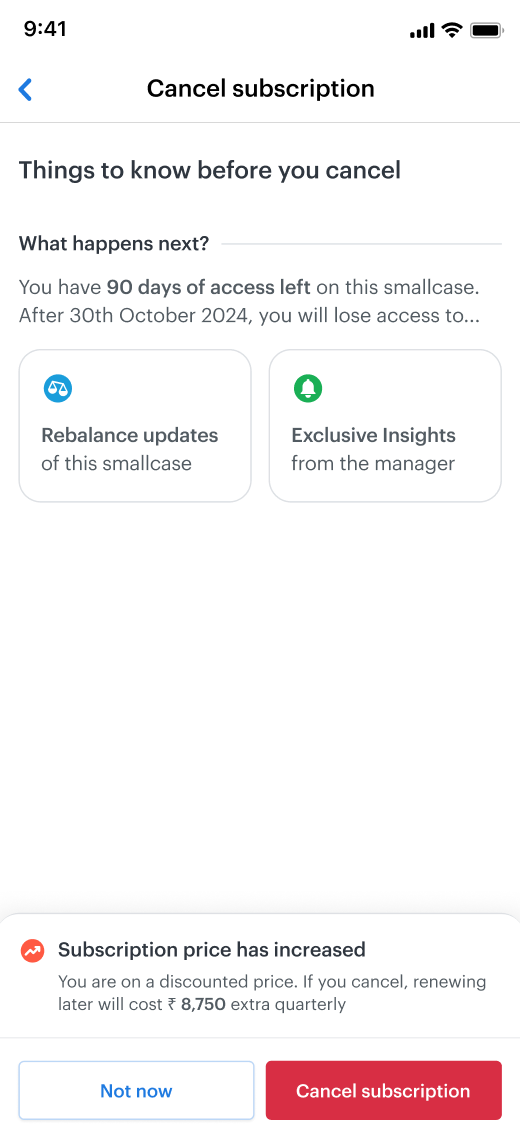
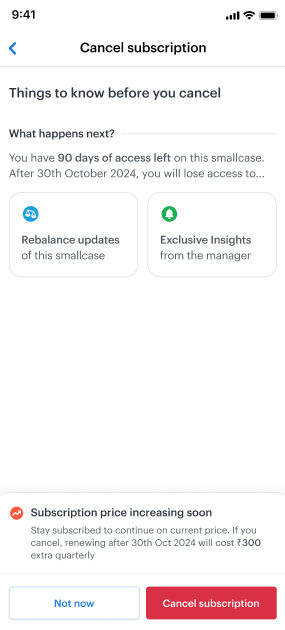
When a subscriber tries to cancel, they will see a nudge on the cancellation screen letting them know that the price has increased (or will increase soon) — encouraging them to stay subscribed and keep their current price.
Below are the nudges that we show under the subscription cancellation flow -
After the price increase
Before the price increase
2. WhatsApp Campaigns
Currently, we send user cohort-based Whatsapp messages for nudging users to renew or resume their subscriptions. These communications help us reduce our subscription churn.
For price-increase enabled smallcase subscription, we have special campaigns which encourage users to stay subscribed at their current pricing -
If users cancel their subscription, we send them WhatsApp messages nudging them to resume before the price goes up. There are two kinds of messages sent - 7 days before the subscription ends, and 1 day before the subscription ends.
If a user’s payment debit fails during subscription renewal, we send a WhatsApp message to them, nudging them to update their payment method before the price of their subscription increases.
Through these initiatives, we have observed an average improvement of ~5% in subscription retention rates. Hence, we encourage enabling the Auto-price increase toggle for all active fee-based smallcases.
How to Enable It?
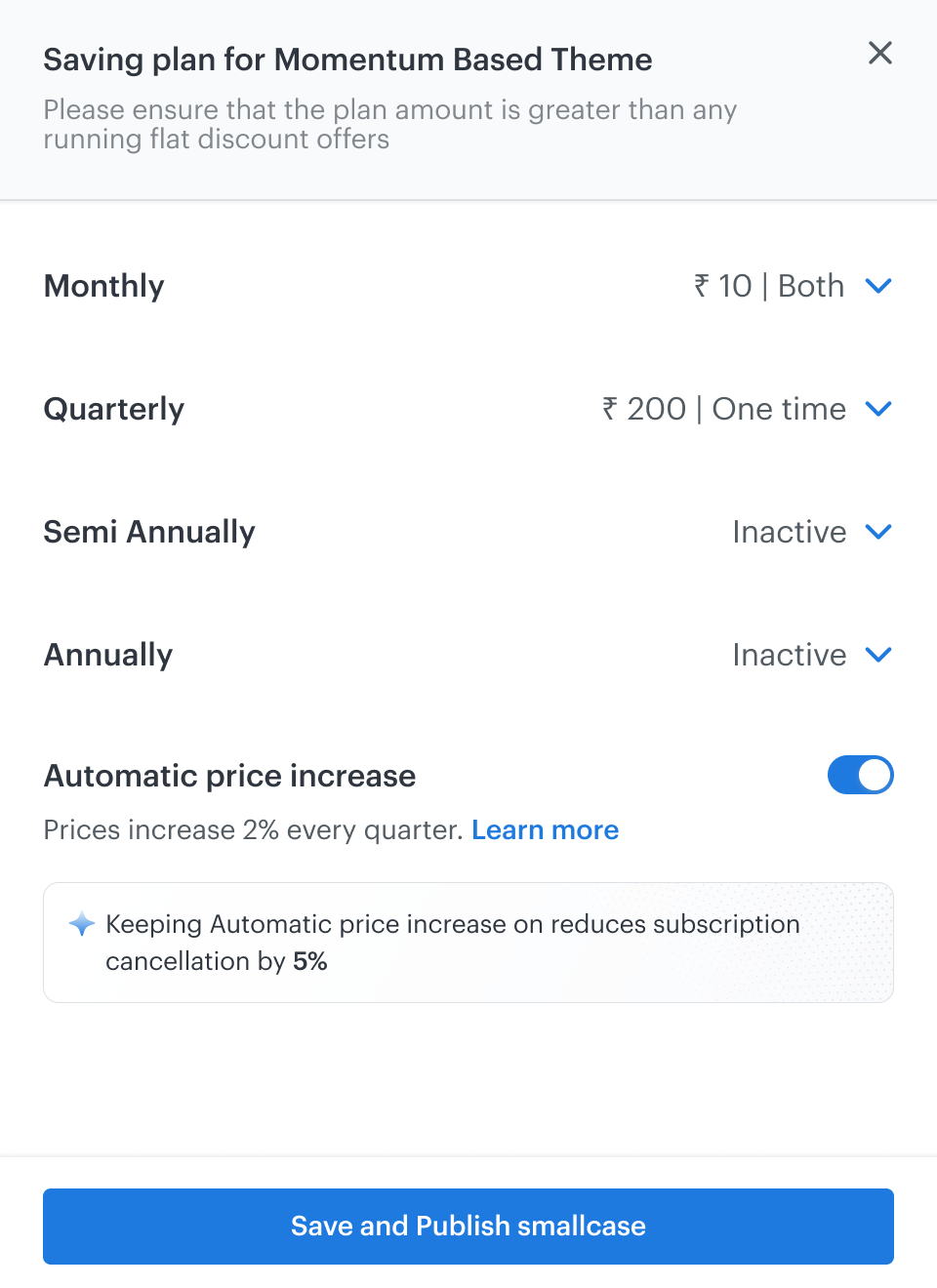
While creating a new smallcase: When you publish a portfolio and set up a fee-based plan, you will see an "Automatic price increase" toggle at the bottom of the plan setup screen. Switch it on and save your plans.
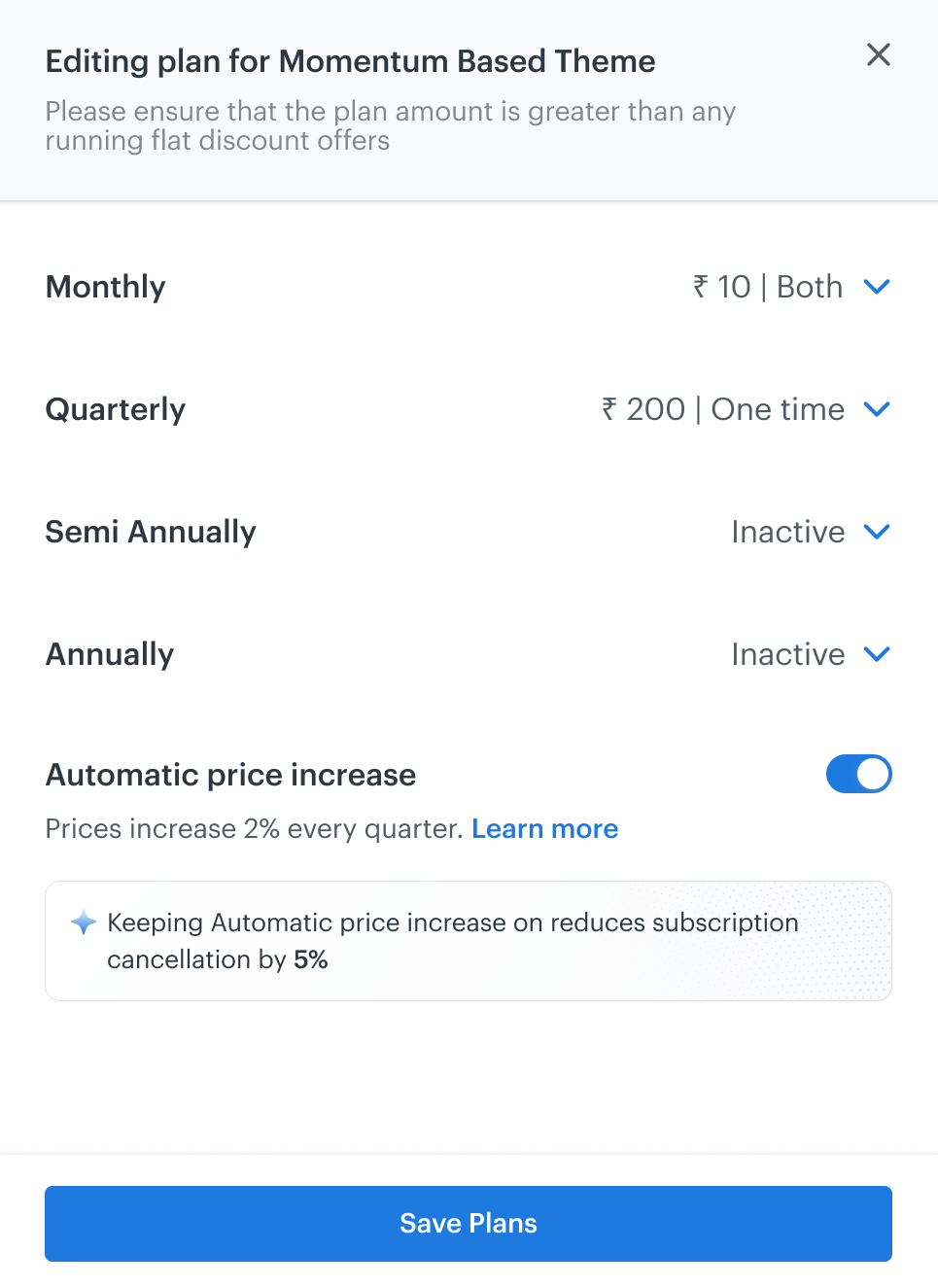
For an existing portfolio:
Go to Plans & Offers from your dashboard.
Find the portfolio you want to enable this for and click Edit Plan.
At the bottom of the screen, you will see the "Automatic price increase" toggle. Switch it on.
Click Save Plans.
You can also see the current status (Active/Inactive) of this feature for each portfolio directly on the Plans & Offers page.
How to Disable It
You can turn this off at any time by following the same steps above and switching the toggle off. Once disabled, no further automatic price increases will be applied to that portfolio.
Frequently Asked Questions
Will my current subscribers be charged the new price immediately? No. Current subscribers will continue renewing at their existing price. The new price applies to new subscribers or re-subscribers.
Can I choose a different price increase percentage? Not at the moment. The increase is fixed at 2% per quarter).
Can I enable this for just one plan (e.g., only the monthly plan)? No. Once enabled for a portfolio, it applies to all active plans under that portfolio.
Can I disable it after the price has already increased? Yes. You can disable it at any time. The price will remain at the last increased value — it will not revert to the older price.